Identifying the Fake Email IdDo you know that it is possible to mail to a person using any person’s email id? It is done using the PHP script. Besides, many invalid IDs are used for the hacking purpose. Hackers use these IDs to get personal information from any people and then use those for illegal purposed. So we will have to know how to find out or identify these fake IDs. In this post, I am trying to give you a small guideline on this topic.The fake emails can come to you saying anything attractive. See the following screenshot. |
 |
Here, an email has been received from a fake email address. Although it is very tough to identify such type of fake email address, you can follow some methods to perform that. One method is sending mail to that person and the second method is to use the web service. If you suspect any email address, then just send a reply to that email address. If that email address becomes fake and has no existence, then a failure message will come to you through which you can become sure about that email address. Email address check is a very good email checker service though which you can easily check the validity of any email address. This is a very easy process. Just go to this site (http://tools.email-checker.com/). Then you will get a page where there is an input field for email address. Just put your email address there and click on the button named “Check..” The screenshot is given below. |
 |
If the email address is valid, then you will a see a result below the input box. If the email address is valid then you will see a green tick marked icon before the email address and if the email address is invalid then you will see a cross marked icon before the email address. See the following screenshots. In the first screenshot, a valid email address is shown and in the second screenshot an invalid email address is shown. |
 |
 |
Here you will have to remember a thing. You can check total 3 email addresses in 24 hours using this website with one IP. If you use proxy, then that is different thing. |

Showing posts with label Internet Tricks. Show all posts
Showing posts with label Internet Tricks. Show all posts
Thursday, July 21, 2011
How to Identify the Fake Email Id

Sunday, July 17, 2011
Great Facebook Tricks & Tips
1. Hide Your Online Status From Selected Friends:
So you want to use Facebook chat but don’t want some people to see your online status? Simply open up the Facebook Chat and click on Friends List. Start creating a new list called BlockList.Once the list is created, add those friends to the list that you want to appear offline to. When the list is complete, hover your mouse to the little green icon adjacent to the list and click Go Offline. Bingo! You will now appear offline to everybody in the BlockList.
2. View a Friend’s Profile Without Messy Applications:
If you are like me, you often get annoyed by the dozens of silly applications that people have added to their profile. Here’s a Grease Monkey script that allows you to view any profile without all those applications. Remember: the Mozilla Firefox web browser is a prerequisite for running Greasemonkey.3. Display Your Facebook Status On Your WordPress Blog:
Want to display your Facebook status updates on your WordPress blog? There is a plugin that does exactly that. StatusPress lets you display your status updates to a widget on your WordPress blog.4. Access Facebook Chat Through Your Desktop:
No need to go to Facebook.com if all you want to do is use Facebook chat. You can do it right from your desktop using clients like social.im , Adium or ChitChat.
5. Update Facebook Status From Firefox:
If you are a firefox addict you don’t need to use any other software to update your Facebook status. Simply install the FireStatus add-on and update your status right from your browser. You can also use the Facebook Toolbar to completely manage Facebook from your Firefox browser.6. Create A Photo Collage From Pictures Of Your Facebook Friends:
Easily create a photo collage from profile pictures of all your Facebook friends using a simple Facebook app called Photo Collage.7. Add A New friend But Hide It From Your Status Update:
A great tutorial by Tim Watson walks you through the process of hiding specific actions from your status updates.8. Schedule Facebook Messages To Be Send Later:
If you want to schedule your Facebook messages to be send sometime in the future, Sendible is a great tool to do that. You can also use Sendible to schedule your status updates.
9. How To Share Flickr Photos On Facebook:
My Flickr is a Facebook application that lets you display your Flickr photos and photo sets on Facebook so your friends can view and comment on them without leaving Facebook.10. How To Download Facebook Photo Albums:
Ever felt the need to download complete photo albums from Facebook. You can easily do it with either a Windows desktop application named FotoBounce or a great Firefox add-on FacePad.
11. Upload Photos On Facebook From Your Phone:
All the smart phones like iPhone and Blackberry make it simple to upload photos to your Facebook account but how would you do it if you have a regular phone? Here is a great tutorial to walk you through that.12. Magic Circles On Facebook:
You might have heard about the Konami code that makes red blurry circles on your Facebook page. This might be one of the most popular Facebook hidden tricks. Here’s how to do it:Press Up, Up, Down, Down, Left, Right, Left, Right, B, A, Enter key then press up & down & Magic circles will appear!To stop them simply reload your page.

13. Use Your Facebook Like A Pirate:
Do you love talking like a pirate? You can set your Facebook to appear like a pirate page by going into Current Language Settings and setting it to English (Pirate).
14. How To Insert Cool Symbols In Your Status Updates:
Make your status updates interesting by inserting cool symbols. Simply copying them from this list and pasting in your status updates.
15. Automatically Poke Friends That Poke You:
Don’t have enough time to poke back friends who poke you on Facebook? Automate it with a Grease Monkey script called Facebook Autopoke.16. Upload Photos From PicasaTo Facebook:
Upload photos to your Facebook account directly from Picasa using the Picasa app for Facebook. You can also upload the Picasa captions and resize your photos before uploading them to Facebook.17. Search Facebook Like A Pro:
Not everybody knows how powerful Facebook search is. Similar to any large search engine, Facebook search has a lot of advanced options to help you search like a pro. For example if you are looking for a person named John Marsh and filter your results down to only people who are married, you can try name: John Marsh status:married. A complete list of search tips for Facebook can be found here.
18. How To Update Facebook Status From Gmail:
Facebook gadget for Gmail allows you to update your Facebook status right from your Gmail.
19. How To Access Gmail From Facebook:
If you seldom have to leave Facebook just to go check your Gmail inbox, check out Fmail. It is a great application that lets you check your Gmail from within your Facebook inbox.20. See Facebook Twitter style:
If you love Twitter more than Facebook, you can view your Facebook just like you view your Twitter using this grease monkey script.21. Import Facebook Friends To Twitter:
FB140 is a simple tool that lets you find all your Facebook friends that are using Twitter so you can easily follow them.22. Access Facebook From Microsoft Outlook:
This is a great tip for people attending colleges or working in places that block Facebook, but allow you access to Microsoft Outlook. Simple install the FBlook plugin and access Facebook from Outlook.23. Display Your Facebook Status Upside Down:
This is a cool and fun trick. To display upside down status updates, simply head over to FlipText and type in your status. Then simply click on Flip Text and copy-paste the upside down text into your Facebook status box.
24. Update Facebook Status Using Twitter:
Wouldn’t you love to update your status on both Facebook and Twitter at the same time. Just install the Twitter application for Facebook. Once synced, your tweets including the #fb tag would automatically be posted as status updates on your Facebook.25. Download Videos From Facebook:
Facebook has one of the largest collection of user uploaded videos.You can download most of the videos from Facebook by using a client like SpeedBit or DownFacbook.
Saturday, July 16, 2011
Capturing a Web-page with only single click
We always come across many situations where we want to save a web-page information for future reference. Generally we use select-copy-paste method to save or we may use Save page as option from browser itself. Often we may face difficulties in reading those save file because of formatting issues. A simple solution to this.
First copy the required page link. You can use Cntrl+C or copy option from right click drop-down list.
Simply click on this link Capture Me!

If you want to capture file which is readable on adobe reader or foxit reader then choose pdf.
Just hit capture button and save the file
Saturday, July 9, 2011
To Block Websites Without Using Any Software [Windows]
Why do you want to Block a specific Website? Or a Specific Type of Websites? Maybe because they are addictive – you waste most of your precious time surfing on them. Many of these so called ‘Time Wasting’ Websites include Facebook, Twitter, MySpace, and other Social Networking Sites. Here’s a very easy to apply setting which can block a website specified by you. In this tutorial, I’ll not ask you to download any kind of Software. All you have to do is edit a Hosts File (and don’t worry! It’s very easy to do so).
Follow these simple steps to block a website or a set of website:
[2] Type in (or copy) the following file address on the Run Box.
[1] Open Run. To do so, search for ‘Run’ on the Start Menu Search Bar. Alternatively, you can use a key combination: Windows Button on Keyboard + R.
[2] Type in (or copy) the following file address on the Run Box.
c:\WINDOWS\system32\drivers\etc\
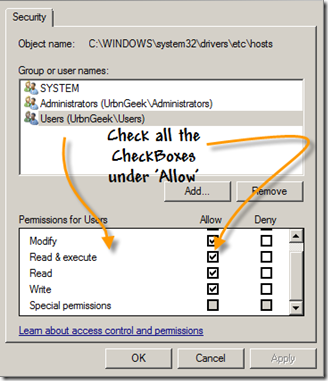
[3] A Folder will open where there will be a File Named ‘hosts’. Right Click on that File and Select ‘Properties’. A New Window will appear. Now, under the ‘Security’ Tab, Click on ‘Edit’ Button and another windows will appear. On that window, select ‘User’ followed by your Computer Name closed in Brackets like this : Users(UrbnGeek\Users). Here’s the screenshot:
[4] Now, check all the Checkboxes under under allow (as done in the screenshot) and then click on ‘Apply’ and then ‘OK’.
[5] Now, close all the windows except the folder window where ‘hosts’ file is located.
[6] Double Click on the ‘hosts’ file and then Windows will ask you if you want to search the internet for the supported application or you want to use an application already installed on your computer. Select the latter one.
[7] You’ll now be presented with a list of programs. Select ‘Notepad’ and click on ‘OK’ Button.
[8] A Notepad will open. Go to the last line, that is 127.0.0.1 localhost and as soon as it ends (one line after it) type in or copy the following line:
127.0.0.1 NameOfYourWebsiteWhichYouWantToBlock.com
Replace the line after the IP Address with the URL of the website which you want to block. For example, if you want to block Facebook.com, then type in: 127.0.0.1 facebook.com

After you save this settings, then try to open the blocked website. You’ll see an ‘Error’ page in any Browser installed on you computer. To unblock the sites, remove the added lines from the notepad.
Friday, July 8, 2011
Ceating Custome Themes For IE & Firefox using BT Engage
Often we get bored of default skins or browser themes. A few years ago Firefox introduced the concept of Personas where in you can download and install the choice of browser themes you like. But developing personas isn’t an easy job unless you’ll a desired set of background images and main logo’s. There are many browser add-ons to create themes, but hardly any of them are so user friendly. A month ago, during my exams Mark Subel who works for BrandThunder sent me a mail via our contact page to review BT Engage.
I would like to clarify that this isn’t any paid review neither do we accept paid reviews. It’s just a case that I liked BT Engage and decided to share it. Currently BT Engage is in the Private Beta stage which means that it is only open to users who have an invite code. So, Mark offered some BT Engage invites so that few of our readers could try it before other’s can try.
I won’t be adding the details about the BT Engage Invites or Giveaway in this post itself as I want to focus on the topic of creating browser themes for Firefox and IE. Those details will be included in a separate giveaway post which will be published shortly. Let’s come to the main topic now.
HowTo Create Custom Firefox Themes or Skins
BT Engage allows you to create custom themes for both Firefox and IE. So let’s take a look at HowTo create a custom Firefox theme first.- Select the Firefox Icon in the “Browser Preview” option.
- Below, you’ll find four tabs named : Backgrounds, Logos, Buttons and My Images respectively. By Default, the Backgrounds tab is selected.
- Select the background image you like or go to the My Images tab and upload your own background image.
- The background image can be increased or decreased in size as per your needs. In short it can be sized the way you want it to be. That’s one of the reasons I say BT Engage is more user friendly as compared to other applications or browser Add-ons.
- Now, repeat the above two steps after selecting the Logos or My Images tab as per your needs or likings.
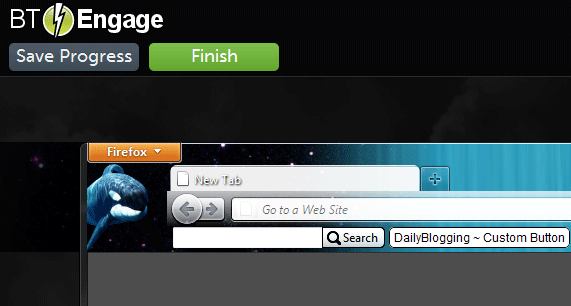
- With BT Engage you can even add buttons. Now that’s another advantage of this web app. See the image, I’ve added a button named ‘DailyBlogging ~ Custom Button’ which links to this blog.
- After you’ve configured the background, logo and buttons, click on the Finish button present at the top of the page.
- Finally hit the Finish button and have some patience till the theme is built completely. Don’t worry even if this process breaks due to disconnection of Internet or if you by mistakenly close your browser’s tab or window.
- BT Engage has an Auto-Save feature and as mentioned above, if the process breaks then your browser themes will be saved as Drafts.
HowTo Create Custom IE Themes or Skins
- Select the IE icon instead of the Firefox icon in the “Browser Preview” option.
- Other steps are same as what we do when creating custom Firefox themes. {Refer the above section}
Monday, June 27, 2011
LIST Of FREE SMS SITES in Internet
https://zyb.com/Code: [Select] [nofollow]
http://www.mobyko.com/Code: [Select] [nofollow]
http://stepsms.com/Code: [Select] [nofollow]
http://www.smstxtbox.com/web/Code: [Select] [nofollow]
http://www.junglesms.com/Code: [Select] [nofollow]
http://50sms.com/Code: [Select] [nofollow]
http://www.ecosms.ch/Code: [Select] [nofollow]
http://www.free--sms.com/index.goCode: [Select] [nofollow]
http://www.pimpmysms.com/Code: [Select] [nofollow]
http://www.islamweb.net/Code: [Select] [nofollow]
http://www.phones.com/Code: [Select] [nofollow]
http://www.devinosms.com/Code: [Select] [nofollow]
http://gsms.se/Code: [Select] [nofollow]
http://www.themobiweb.com/en/sms.htmlCode: [Select] [nofollow]
http://my.phonegnome.com/Code: [Select] [nofollow]
http://sms4u.biz/signup.phpCode: [Select] [nofollow]
http://simsor.com/registerCode: [Select] [nofollow]
http://www.mobik.com/mobik/client/Code: [Select] [nofollow]
http://www.smsdiscount.com/en/index.htmlCode: [Select] [nofollow]
http://4usms.net/Code: [Select] [nofollow]
http://www.sendsmsnow.com/Code: [Select] [nofollow]
http://www.unisms.uni.cc/Code: [Select] [nofollow]
http://www.atrochatro.com/Code: [Select] [nofollow]
http://www.gsmvault.com/Code: [Select] [nofollow]
http://smscity.com/Code: [Select] [nofollow]
http://www.sms2india.org/Code: [Select] [nofollow]
http://www.freesms.web.tr.tc/Code: [Select] [nofollow]
http://www.d1g.com/Code: [Select] [nofollow]
http://thesmszone.com/Code: [Select] [nofollow]
http://zyb.com/Code: [Select] [nofollow]
http://www.vazu.com/Code: [Select] [nofollow]
http://www.sms.ac/Code: [Select] [nofollow]
http://www.agentsms.com/Code: [Select] [nofollow]
http://www.mobizone.com/Code: [Select] [nofollow]
http://www.yellowpages.com.eg/Code: [Select] [nofollow]
http://www.boswtol.com/Code: [Select] [nofollow]
www.masrawy.com/smsCode: [Select] [nofollow]
http://www.resalh.com/DOWNLOAD NOKIA OVI STORE APPS DIRECTLY TO UR PC
download Ovi Store apps to computer, which can be later transferred to your Nokia phone. Just follow this article thoroughly.
What you need to use:
* Mozilla Firefox 3.6.10 or earlier.
* PC running Windows OS.
* Nokia Multimedia phone.
* Nokia account.
How to download Nokia Ovi store application to PC:
* Open Mozilla Firefox and go to Tools >> Add-ons.
* Click on Get Add-ons tab and search for User Agent Switcher.
* Install User Agent Switcher and restart Firefox.
* Open Notepad and paste the following codes:
Code: [Select]
<useragentswitcher><useragent description=”Internet Explorer 7 (Windows Vista)” useragent=”Mozilla/4.0 (compatible; MSIE 7.0; Windows NT 6.0)” appcodename=”” appname=”Microsoft Internet Explorer” appversion=”4.0 (compatible; MSIE 7.0; Windows NT 6.0)”platform=”Win32? vendor=”” vendorsub=””/><useragent description=”Netscape 4.8 (Windows Vista)” useragent=”Mozilla/4.8 [en] (Windows NT 6.0; U)” appcodename=”” appname=”Netscape” appversion=”4.8 [en] (Windows NT 6.0; U)” platform=”Win32? vendor=”” vendorsub=””/><useragent description=”Opera 9.25 (Windows Vista)” useragent=”Opera/9.25 (Windows NT 6.0; U; en)” appcodename=”” appname=”Opera” appversion=”9.25 (Windows NT 6.0; U; en)” platform=”Win32? vendor=”” vendorsub=””/><useragent description=”Nokia 5230? useragent=”Mozilla/5.0 (SymbianOS/9.4; U; Series60/5.0 Nokia5230/10.0.067; Profile/MIDP-2.1 Configuration/CLDC-1.1 ) AppleWebKit/413 (KHTML, like Gecko) Safari/413? appcodename=”” appname=”” appversion=”” platform=”” vendor=”” vendorsub=””/></useragentswitcher>
* If you are not using Nokia 5230, Replace all 5230 in the above code with the model number of your phone, like N97 for Nokia N97, or E71 for Nokia E71, and so on.
* Save this file with .xml extension.
* Now open Firefox and go to Tools >> Default User Agent >> Edit User Agents.
* Click on Import.
* Browse and add the above mentioned .xml file.
* Now go to Tools >> Default User Agent and select your phone’s model number.
* Open http://store.ovi.mobi/.
Now, on your Nokia phone, Firefox will work as the default browser, and you can download any Ovi Store file on your PC, and then transfer them to your phone via USB cable or Bluetooth.
For your notification: Once you complete downloading Ovi Store applications, change user agent back to default user agent, by going to Tools >> Default User Agent >> Default User Agent.
If not, Firefox will keep behaving like your mobile phone’s browser.
Collection Of New Use Full Sites Must See It
There are thousands of websites which were released in 2010.
Some are very useful to day to day life. The websites which i
am going to give now are very useful sites as per my
knowledge. But these sites are not much into people. This is
my own websites collection which you will like for sure. I may
miss some very useful sites which are not famous enough. In
that case, please mention them in the comments section
below. I am personally saying the sites are not famous
because of the Alexa ranking of the sites. Not all the sites are
unpopular below. Some are too good in ranking, but people
are not aware of them properly.
1. MathTV.com – Awesome website to learn mathematics
with experts advice.
2. PrivacyDefender – The Easy Way to Control Your Facebook
Privacy Settings.
3. Funphotobox – Add your own pictures in funny,GIF images
with default frames.
4. DiffChecker – A tool that quickly & easily gives the text
differences between two blocks of text.
5. Kurrently – A real-time search engine for Facebook and
Twitter.
6. Logaway – Free Online Password Manager (1 login for
1000′s of sites)
7. Picknzip – Allow you to download photos from Facebook in
a single zip or pdf file.
8. Boston/BigPicture – New Stories in Photographs.
9. Ohlife – A Personal Journal.
10. TuxPaint – A Open Source Drawing Software for Children.
11. Explania – Watch hundreds of animated explanations,
interactive tutorials.
12. Twithelp – Simple and quick Twitter Help.
13. Fflick – fflick is movie reviews by you and your friends.
14. USBFlashCopy – A small Windows utility to back up your
flash drives & storage cards.
15. Flisti - Create free online polls without signing-up.
16. Unhearit - Listen Awesome Songs 24/7 Without Any Non-
sense.
17. Clipconverter – Free Best Online All Media Converter.
18. Jottle – A Face to Face Chat Without Any Non-sense.
19. Talkminer – Search inside video lectures and talks.
20. LearnBoost – A Free and amazing Gradebook.
21. TinEye – Image Search engine which displays all the
information about that image.
22. Keepaboo – About your child and Capturing memories.
23. HappyCV - A Free Online Resume Builder.
24. Blekko – A Search Engine which uses slashtags to search
the results.
25. Vye Music – All the music you could need. Find it and play
it.
26. MomentGarden - Create and Share our Child’s Story.
27. Lockittight – Provides theft recovery assistance for mobile
devices.
28. Findbigmail – Increase your gmail account mail space.
29. HateVille – Like What Others Hate.
30. Psykotube – A Video Search Engine Site.
31. ListFav - Lists out your favorite things in all categories.
32. 8Tracks – A handcrafted internet radio to share & discover
music online mix.
33. AlertFul – Reminds you of the important events by email.
34. Failin – Know what your friends and people think of you.
35. Vsee – High Quality, Low Bandwidth Video Conference.
36. CForum – A Discussion point to post all your computer
related queries.
Some are very useful to day to day life. The websites which i
am going to give now are very useful sites as per my
knowledge. But these sites are not much into people. This is
my own websites collection which you will like for sure. I may
miss some very useful sites which are not famous enough. In
that case, please mention them in the comments section
below. I am personally saying the sites are not famous
because of the Alexa ranking of the sites. Not all the sites are
unpopular below. Some are too good in ranking, but people
are not aware of them properly.
1. MathTV.com – Awesome website to learn mathematics
with experts advice.
2. PrivacyDefender – The Easy Way to Control Your Facebook
Privacy Settings.
3. Funphotobox – Add your own pictures in funny,GIF images
with default frames.
4. DiffChecker – A tool that quickly & easily gives the text
differences between two blocks of text.
5. Kurrently – A real-time search engine for Facebook and
Twitter.
6. Logaway – Free Online Password Manager (1 login for
1000′s of sites)
7. Picknzip – Allow you to download photos from Facebook in
a single zip or pdf file.
8. Boston/BigPicture – New Stories in Photographs.
9. Ohlife – A Personal Journal.
10. TuxPaint – A Open Source Drawing Software for Children.
11. Explania – Watch hundreds of animated explanations,
interactive tutorials.
12. Twithelp – Simple and quick Twitter Help.
13. Fflick – fflick is movie reviews by you and your friends.
14. USBFlashCopy – A small Windows utility to back up your
flash drives & storage cards.
15. Flisti - Create free online polls without signing-up.
16. Unhearit - Listen Awesome Songs 24/7 Without Any Non-
sense.
17. Clipconverter – Free Best Online All Media Converter.
18. Jottle – A Face to Face Chat Without Any Non-sense.
19. Talkminer – Search inside video lectures and talks.
20. LearnBoost – A Free and amazing Gradebook.
21. TinEye – Image Search engine which displays all the
information about that image.
22. Keepaboo – About your child and Capturing memories.
23. HappyCV - A Free Online Resume Builder.
24. Blekko – A Search Engine which uses slashtags to search
the results.
25. Vye Music – All the music you could need. Find it and play
it.
26. MomentGarden - Create and Share our Child’s Story.
27. Lockittight – Provides theft recovery assistance for mobile
devices.
28. Findbigmail – Increase your gmail account mail space.
29. HateVille – Like What Others Hate.
30. Psykotube – A Video Search Engine Site.
31. ListFav - Lists out your favorite things in all categories.
32. 8Tracks – A handcrafted internet radio to share & discover
music online mix.
33. AlertFul – Reminds you of the important events by email.
34. Failin – Know what your friends and people think of you.
35. Vsee – High Quality, Low Bandwidth Video Conference.
36. CForum – A Discussion point to post all your computer
related queries.
HOW TO BOOST AND INCREASE INTERNET SPEED
By Default, XP reserves 20% of your bandwidth for it’s own use. This is a crying shame and should be undone immediately. To do this, you will not require any additional software, just follow the steps below.
Access the Group Policy Editor. This can be done by typing gpedit.msc in the Run box (Start, and then Run). You will now be looking at something like this.
Navigate to Computer Configuration/Administrative Templates/Network/QOS Packet Scheduler using the pane on the left side.
In the left pane, there should be a Setting with the name Limit reservable bandwidth, right-click this and select properties.
Now this might seem a bit weird, as the State will say “Not Configured” but Windows by default will reserve 20%. So the trick is to set it to reserve 0%. You can do this by clicking enabled and then setting the Bandwidth Limit % to 0. It should look like the image below.
Hit OK then close the Group Policy Editor.
That’s it! You’re done with the first tweak. Just a quick side note here, there are lots of other little things you can change easily using the policy editor. Feel free to wander around!
Tweak 2: Optimizing TCP/IP settings
This next tweak is going to require a piece of freeware called SG TCP Optimizer. This nifty little utility will optimize the manner in which your PC sends and receives data packets, which will as a result speed up your connection. Though It is most effective for broadband connections, it works for just about any type of connection.
Download SG TCP Optimizer. You don’t need to install it, just double-click and it will run. Once you run it, you should be looking at this :
That is quite an intimidating interface, but we won’t be touching most of it. Under the General Settings tab, just drag the slider to match your connection’s download speed. Then, at the bottom of the same window, select the “Optimal Settings” radio button and click “Apply Changes”.
You will now be looking at a window like the one below.
Make sure that the “Backup” tick box is ticked and then click OK.
All that’s left is to reboot your system, in order to apply the changes. You will be prompted to do so.
Once your system has rebooted, surf around for a while. If for whatever reason you feel your connection has been affected negatively, then fear not, for the changes you made can be undone. Start SG TCP Optimizer, click File and choose restore backed up settings. This will bring up a dialog box where you can navigate to where you downloaded the program. There, you will find a file with the extension .spg with a filename containing the date.
For example If you applied the changes on the 21st of February “sg_backup_2008-02-21-xxxx.spg” would be the filename, where the xxxx is any number. Once you find this file select it and press open. This should bring to a dialog box similar to the one shown above. Click OK and reboot. Your original settings are now restored.
Access the Group Policy Editor. This can be done by typing gpedit.msc in the Run box (Start, and then Run). You will now be looking at something like this.
Navigate to Computer Configuration/Administrative Templates/Network/QOS Packet Scheduler using the pane on the left side.
In the left pane, there should be a Setting with the name Limit reservable bandwidth, right-click this and select properties.
Now this might seem a bit weird, as the State will say “Not Configured” but Windows by default will reserve 20%. So the trick is to set it to reserve 0%. You can do this by clicking enabled and then setting the Bandwidth Limit % to 0. It should look like the image below.
Hit OK then close the Group Policy Editor.
That’s it! You’re done with the first tweak. Just a quick side note here, there are lots of other little things you can change easily using the policy editor. Feel free to wander around!
Tweak 2: Optimizing TCP/IP settings
This next tweak is going to require a piece of freeware called SG TCP Optimizer. This nifty little utility will optimize the manner in which your PC sends and receives data packets, which will as a result speed up your connection. Though It is most effective for broadband connections, it works for just about any type of connection.
Download SG TCP Optimizer. You don’t need to install it, just double-click and it will run. Once you run it, you should be looking at this :
That is quite an intimidating interface, but we won’t be touching most of it. Under the General Settings tab, just drag the slider to match your connection’s download speed. Then, at the bottom of the same window, select the “Optimal Settings” radio button and click “Apply Changes”.
You will now be looking at a window like the one below.
Make sure that the “Backup” tick box is ticked and then click OK.
All that’s left is to reboot your system, in order to apply the changes. You will be prompted to do so.
Once your system has rebooted, surf around for a while. If for whatever reason you feel your connection has been affected negatively, then fear not, for the changes you made can be undone. Start SG TCP Optimizer, click File and choose restore backed up settings. This will bring up a dialog box where you can navigate to where you downloaded the program. There, you will find a file with the extension .spg with a filename containing the date.
For example If you applied the changes on the 21st of February “sg_backup_2008-02-21-xxxx.spg” would be the filename, where the xxxx is any number. Once you find this file select it and press open. This should bring to a dialog box similar to the one shown above. Click OK and reboot. Your original settings are now restored.
Get 6 Months Genuine License Key For Avira Premium Security Suite 10! (HURRY UP!)
Avira Premium Security Suite 10 is one of the most efficient security suites that makes you to forget about the security of your system if you are having it loaded in your system.
In order to prove their impact, Avira is currently offering us to Download Free Avira Premium Security Suite 10 With 6 Months License Key.
In process of the strategy, Avira of-course can't afford to provide their product with 6 month License key freely for entire world. So they have offered this offer in German version which can be changed to normal English version.
Here is the process that helps you download Free Avira Premium Security Suite 10 With 6 Months License Key
1. Visit Avira's Official German Promotional Page

2. After Clicking on Download, you have to select destination folder and start downloading Avira Premium Security Suite 10. Then Double click on the setup file after downloading.
3. Select the Produckt testen option and then click on Next. If you face any errors(which is just because of the Windows Defender), even then click on Next.
4.Then you will notice a new pop-up dialog box 'Registrierung' . In Anrede field select 'Herr'. In Vorname (Your first name) and the Nachname (Your Last Name). Enter your valid email id in the next field Email wiederholen and click on Next.
5. Follwed by this, you will now notice a dialog box 'Ergnebis' which will display Your Name, Serial Number, and 184 day Subscription period. Click on Cancel and exit the installation process.
6. You will receive the subscription message to your Mail-ID, click on that link. You will be redirected to your account and there download hbdev.key file.
7. Download Avira Premium Security Suite 10 and install it.

Thats it, you are done.
You can Enjoy the entire 6 month Free License Key for Avira Premium Security Suite 10.
I hope you'll like it.
In order to prove their impact, Avira is currently offering us to Download Free Avira Premium Security Suite 10 With 6 Months License Key.
In process of the strategy, Avira of-course can't afford to provide their product with 6 month License key freely for entire world. So they have offered this offer in German version which can be changed to normal English version.
Here is the process that helps you download Free Avira Premium Security Suite 10 With 6 Months License Key
1. Visit Avira's Official German Promotional Page
Code: [Select] [nofollow]
http://www.avira.com/de/promotion-starmoneyAnd then click on the download button.2. After Clicking on Download, you have to select destination folder and start downloading Avira Premium Security Suite 10. Then Double click on the setup file after downloading.
3. Select the Produckt testen option and then click on Next. If you face any errors(which is just because of the Windows Defender), even then click on Next.
4.Then you will notice a new pop-up dialog box 'Registrierung' . In Anrede field select 'Herr'. In Vorname (Your first name) and the Nachname (Your Last Name). Enter your valid email id in the next field Email wiederholen and click on Next.
5. Follwed by this, you will now notice a dialog box 'Ergnebis' which will display Your Name, Serial Number, and 184 day Subscription period. Click on Cancel and exit the installation process.
6. You will receive the subscription message to your Mail-ID, click on that link. You will be redirected to your account and there download hbdev.key file.
7. Download Avira Premium Security Suite 10 and install it.
Code: [Select] [nofollow]
http://dlpe.antivir.com/package/wks_avira/win32/en/isec/avira_premium_security_suite_en.exeActivate it by clicking on option I already have a valid hbedv.key file.Thats it, you are done.
You can Enjoy the entire 6 month Free License Key for Avira Premium Security Suite 10.
I hope you'll like it.
Send Free SMS To India Direct From Google Chrome :)
Today I Have Build A Google Chrome Extension To Send FREE SMS Anywhere In India ,Without Any Registration Without any Cost  send Free SMS direct From Your GOOGLE CHROME web browser .
90% credit goes to foosms contact
Screen Shot

Here Is Link For extension
Mirror

Thnxxxx
send Free SMS direct From Your GOOGLE CHROME web browser .90% credit goes to foosms contact
Screen Shot
Here Is Link For extension
Code: [Select] [nofollow]
http://www.chromeextensions.org/?attachment_id=14956Mirror
Code: [Select] [nofollow]
http://www.chromeextensions.org/wp-content/uploads/2011/06/SEND-FREE-SMS-TO-INDIA1.crxThnxxxx
Download TORRENT a new way - Direct Download
Hello dear friends,
Many people have daily habit to download torre*nts from different sites. We know that torre*nts downloading is illegal because most piracy is done on internet through torre*nts . Even it is most famous on internet and increasing its fan following and members day by day.
So in offices, schools, banks or any public areas there are administrative rights are disabled and they giving limited (standard) account. So some places utorre*nt, bittorre*nt like torre*nt applications are strictly prohibited.
On @ that situation what will you do if you want to download torre*nts..........?
So lets discuss about this interesting matter today.
We have 4 options.
1) Torrific : - We all know about it. So just leave it.
2) Fetch .io: - A few days before I shared this. This is also a good option. But nowdays its also not working. The bittorre*nt option is currently disabled by them and their service become very slow now- a- days. ( Sab members ne fetch io ki waat laga dali...... )
)
Now lets discuss about 2 new options.
3) bitlet.org : - Bitlet.io is an online torre*nt downloader which runs entirely in your web browser. It allows you to download files using bittorre*nt without having to install any other third party application.
Just visit this site.

1) Just put the url of any torre*nt file and click on download torre*nt.
2) Then it will open another window and take some time , says loading machine.
3) Then select target location where you want to save that file.
4) And start download

5) You can choose settings using settings option.
6) Remember You must have Java installed to use this facility.
Our 4th option is also very interesting.
4) torre*nt2exe: - This site also useful to download torre*nts online without using any third party application because they self developed their own torre*nt downloader file.
Visit
What do you want to do now.....?
1) Just go to their website.
2)Paste the url of your torre*nt which you want to download
or
browse that torre*nt if you have already downloaded in PC.

3)Select Normal size or Small size, both have no such big difference. Choose any option.
4) Click on Direct URL of the exe-file . They will create their own exe torre*nt setup file to download that torre*nt.
5) Press start download.
6) Download that small file which is in KB size
7) Save it on desktop. Now open that file.
 Now when you open that file, a windows security alert appear. Click on unblock.
9) Now your torre*nt exe is ready to download your torre*nt file.
See here.

10) You can pause or resume it according to your work time.
There are so many services are like this availabe on Internet. But mostly all are paid. I am sharing you only free services which are do their job as good as possible.
I am not supporting piracy. I am just sharing this knowledge purpose only that you all must know.
So friends how do you like this. Try and please reply.
Many people have daily habit to download torre*nts from different sites. We know that torre*nts downloading is illegal because most piracy is done on internet through torre*nts . Even it is most famous on internet and increasing its fan following and members day by day.
So in offices, schools, banks or any public areas there are administrative rights are disabled and they giving limited (standard) account. So some places utorre*nt, bittorre*nt like torre*nt applications are strictly prohibited.
On @ that situation what will you do if you want to download torre*nts..........?
So lets discuss about this interesting matter today.
We have 4 options.
1) Torrific : - We all know about it. So just leave it.
2) Fetch .io: - A few days before I shared this. This is also a good option. But nowdays its also not working. The bittorre*nt option is currently disabled by them and their service become very slow now- a- days. ( Sab members ne fetch io ki waat laga dali......
) Now lets discuss about 2 new options.
3) bitlet.org : - Bitlet.io is an online torre*nt downloader which runs entirely in your web browser. It allows you to download files using bittorre*nt without having to install any other third party application.
Just visit this site.
Code: [Select]
http://www.bitlet.org/1) Just put the url of any torre*nt file and click on download torre*nt.
2) Then it will open another window and take some time , says loading machine.
3) Then select target location where you want to save that file.
4) And start download
5) You can choose settings using settings option.
6) Remember You must have Java installed to use this facility.
Our 4th option is also very interesting.
4) torre*nt2exe: - This site also useful to download torre*nts online without using any third party application because they self developed their own torre*nt downloader file.
Visit
Code: [Select]
http://www.torre*nt2exe.com/ (remove * )What do you want to do now.....?
1) Just go to their website.
2)Paste the url of your torre*nt which you want to download
or
browse that torre*nt if you have already downloaded in PC.
3)Select Normal size or Small size, both have no such big difference. Choose any option.
4) Click on Direct URL of the exe-file . They will create their own exe torre*nt setup file to download that torre*nt.
5) Press start download.
6) Download that small file which is in KB size
7) Save it on desktop. Now open that file.
Now when you open that file, a windows security alert appear. Click on unblock.9) Now your torre*nt exe is ready to download your torre*nt file.
See here.
10) You can pause or resume it according to your work time.
There are so many services are like this availabe on Internet. But mostly all are paid. I am sharing you only free services which are do their job as good as possible.
I am not supporting piracy. I am just sharing this knowledge purpose only that you all must know.
So friends how do you like this. Try and please reply.
Subscribe to:
Posts (Atom)